Job Seeker Frequestly Asked Questions

*Please note - These FAQ's are a continual work in progress.
Help us by sharing relevant items not covered here. Thanks! - Hunter
Creating an Account
Is GCJobs.com free?
- Yes. Creating an account, searching jobs, and applying are always free for Job Seekers.
How do I create an account?
- Click the black
 button at the top of our home page> Under the "Choose your Account Type" section, clicl on "Job Seeker"> input your information. Once complete, click the green
  button.
Do I need a resume?
- No, but uploading one greatly improves your chances of being contacted.
Can I use a Resume formatted from another service, such as LinkedIn or another Job Board?
- Yes. For LinkedIn, go to your LinkedIn profile - make sure you a "viewing" your profile. Under your name you will see a round button with 3 dots.
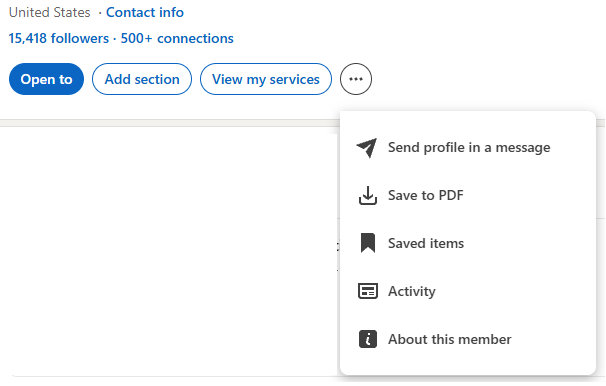
- Click on the "Save to PDF option from the drop down, which will prompt your download.
- With other Job Board formats download your profile as a .pdf.
- Once you have it saved, you can upload that document here during your Job Seeker Registration, or later when you log back into your account.
Can I update my resume later?
- Yes
Account
Where do I Login once I create an account?
- Our "Login" link is set to the left of the Black "Sign Up" button at the top of our Home Page.
- Once Logged In instead of seeing "Login", you will see your name. You can access all of your account information there.
- Your Logout button is also located in this link
Can I change my email?
- Yes.
How do I reset my password?
- Go to the Login link located to the left of the black Sign Up button. Click the Login Link> you will see the Forgot your password? link at the bottom of the page. Click there and provide your e-mail when prompted.
How do I delete my account?
- Login using the Login link at the top of our Home Page. Once loggedin, look for the "My Account" button located on the left side of your account page, and click on it > the
 button is in Red and at the bottom of your Account Page.
Searching Jobs
How do I search for jobs?
- The primary area to search for jobs can be found directly in the middle of our web site:
 you can search by inputting specific "skills, company names, trades, tags, and more.
- You can also simply select from one of our 6 primary Categories: General Construction jobs, Sub Contractor Jobs, Architect / Engineeer Jobs, Civil Construction, Building Products, Facility and Service Trades Jobs or Travel / Per Diem focused Jobs.
- You can also limit your search by Location (US Based only).
- Once your inputs are in, click the orange Search button.
- You can also simply click on one of the Category buttons, to quickly go to that Categories Postings.

Applying
How do I apply?
- Once your search returns with results, identify the Posting you want to Apply to and Click on it. You will see a green "Apply" button. Click on the Apply button :
 If you are not already logged in, you will need to provide your Contact information, and accept our Terms of Service and Privacy Policy
  Once your information is input, Click the Green "Next" button.
- Registered Job Seekers can use our "Easy Apply" button to get their Profiles in front of the Employers hiring team quickly
- The Easy Apply button is located at the bottom of the Jobs search results, and on the right hand side of the Job Description Page.

Can I apply using my phone?
- Yes. GCJobs.com is mobile friendly. Just be sure you have a Resume on your Phone to provide when prompted
Can I track my applications?
- Yes, with a created Account, you will be able to see your Applications on the left side of your Account / Profile page, as well as via a drop down when you hover your mouse over your name when logged in

Profile
Can employers find my resume?
- Yes, provided you have selected the "Available for work" button on your profile page

- Be sure to click the green save button after clicking the Available to work box.
- This allows you to control your privacy settings.
Can I upload certifications?
- Yes, we highly recommend it! You should include trade specific certifications, OSHA, NCCER, CDL, TWIC,
- MSHA, welding, CPR, First Aid, and any other relevant credentials. To do this, go to your Profile page and look for the "Choose another File" link directly under your uploaded resume file you already have uploaded.

- Don't forget to click the green "Save" Button to ensure all uploads are saved.
Can I upload multiple resumes?
- Yes, technically, however we would recommend only your most recent fully updated Resume is there. Cover letters can be considered "Another" file
Can I add references?
- Yes. List them as "Another" file in an upload or within your Resume itself.
Job Alerts
Can I receive job alerts?
- Yes, as a Registered Job Seeker
How often are alerts sent?
- Daily or as new Jobs are Posted
Travel Construction
What is a Travel / Per Diem Construction job?
- A temporary project that requires working away from home during the projects build time frame.
What does Per Diem mean?
- A daily allowance for meals, lodging, or travel expenses. These items are discussed directly with the hiring team of the Employer with the job
Safety & Security
Does GCJobs.com verify employers?
- We routinely audit GCJObs.com Registered Users and their Postings, or Profiles working to ensure legitimate Users are using our platform
Will GCJobs.com ever ask for my Social Security number?
- No. Never provide your sensitive information until you've verified an employer.
Support
Who do I contact if I need help?
You'll find our ChatBox - "Hunter", located in the bottom right of our web site. Drop Hunter a note and one of our Job Seeker Support Specialists will contact you directly